Project · Codebase
The Codebase tab lists every analysed source file. Select one to read its code side by side with a plain-language explanation, and switch to its functions to see each one explained.
Don't see this tab? It exists only when codebase analysis was included at import or re-analysis. Turn it on with an incremental re-analysis — see Keep documentation up to date.
What this page is forUnderstand individual files and functions without reading every line.
Open it fromThe Codebase tab of a project, or a class button under the Code (L4) diagram.
Typical next stepGo back to the big picture on Architecture.
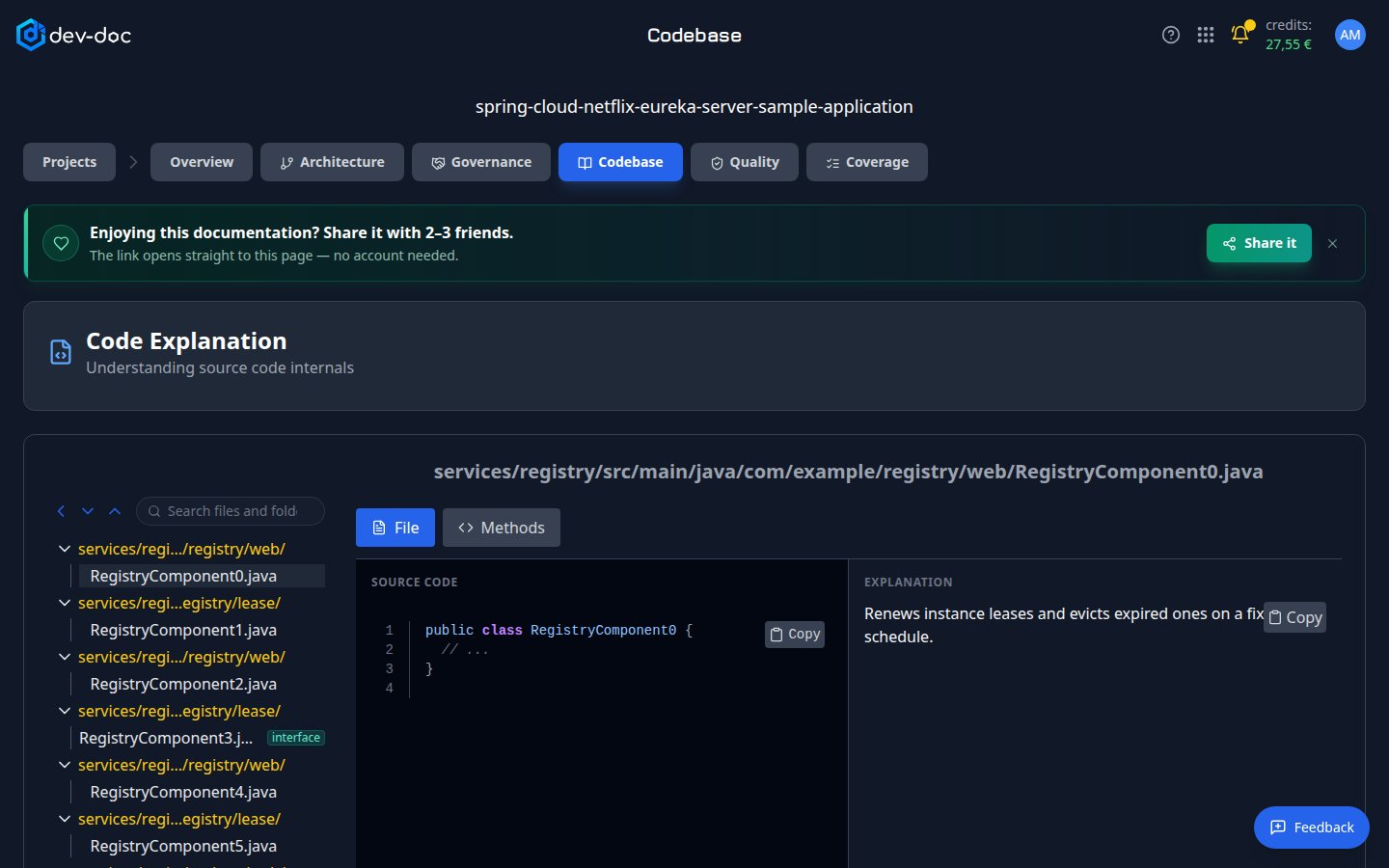
- Search files and folders — filter the file tree by name.
- Expand / collapse — open or close all folders at once. The arrow on the left hides the file tree to give the code more room.
- File — click a file to open it. Folders are shown in yellow above their files.
- Interface badge — the file declares an interface — a contract other classes implement.
- File / Methods — File shows the whole file and its explanation; Methods lists each function with its own explanation.
- Source code — the file with line numbers. Copy copies it.
- Explanation — what the file does, in plain language. More… opens the full explanation.