Download your documentation
Your documentation is yours to keep. Download it as one ZIP file — plain Markdown for a wiki or a repository, an arc42 architecture document (also as AsciiDoc sources for docToolchain), and, for Cyber Resilience Act and NIS2 security reviews, a component list (SBOM) in two formats, a supplier fact sheet and a completeness check against the German SBOM guideline BSI TR-03183-2.
Download in three steps
- Click the download icon on the project's card, or Download above the documentation on the Overview tab.
- Tick the parts you want. They are grouped; the box next to a group's name selects or clears the whole group. The Documentation group is ticked to start with; tick arc42 or Cyber Resilience Act / NIS2 when you need them.
- Click Download. Your browser saves a ZIP named after the project and the date.
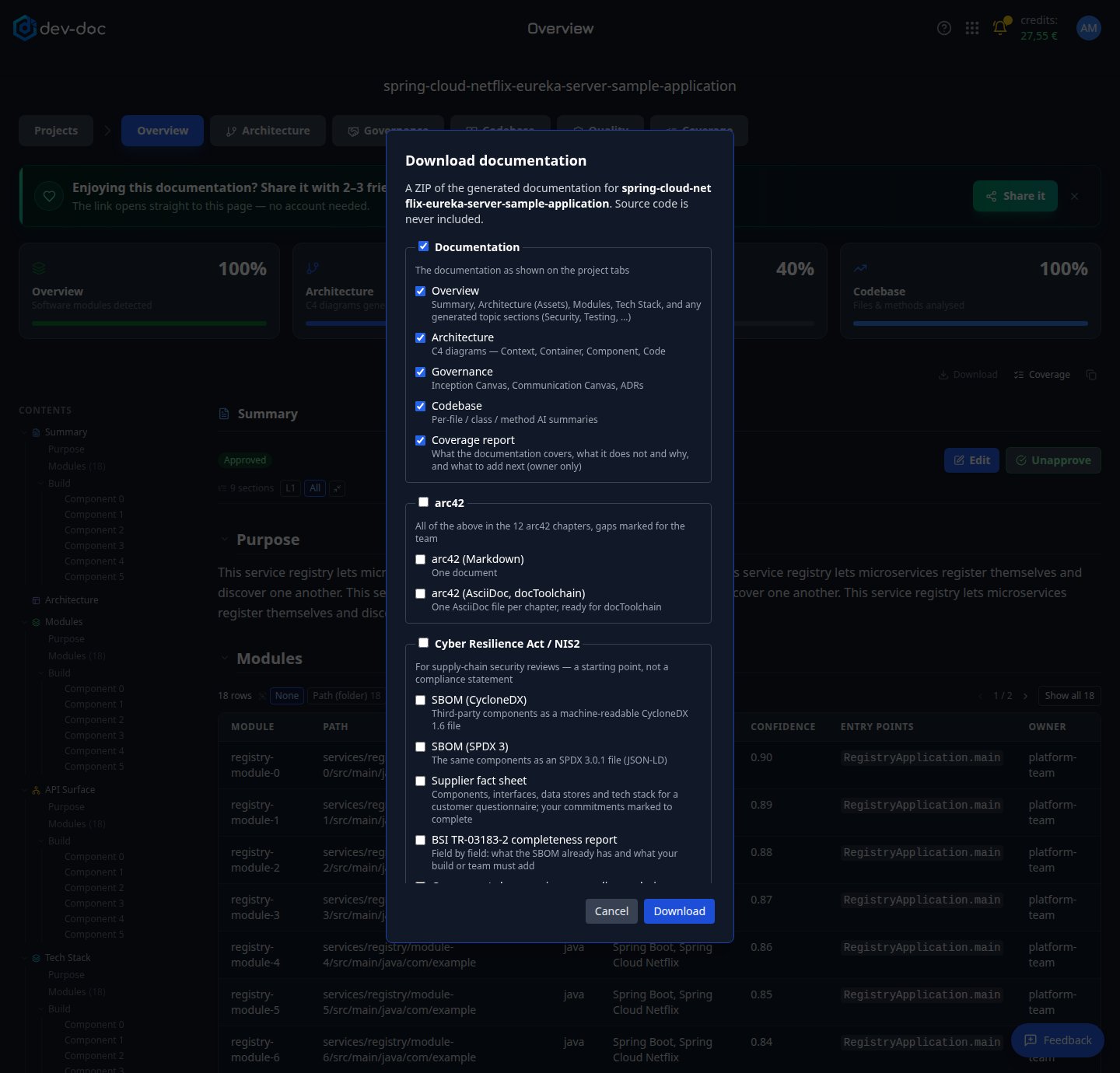
- Documentation — the documentation as you see it on the tabs: Overview, Architecture, Governance (one file per canvas and one with all decision records) and, when the project was analysed with its codebase, the Codebase explanations. If you own the project, also the Coverage report — see Coverage; nobody else is offered it.
- arc42 — the same material arranged in the 12 chapters of the arc42 architecture template: as one Markdown file, and as AsciiDoc sources (one file per chapter) ready for docToolchain.
- Cyber Resilience Act / NIS2 — the third-party components of your software as an SBOM (CycloneDX and SPDX 3), a supplier fact sheet for your customers' security reviews, a BSI TR-03183-2 completeness report, and the component changes since an earlier analysis. See below.
- Download — builds the ZIP. Large projects can take a few seconds.
- Whole group — the box next to a group's name ticks or clears every item in it.
The arc42 document
arc42 is a widely used template for architecture documentation, organised in 12 chapters — from goals and constraints through building blocks and deployment to risks and a glossary. dev-doc fills each chapter from what it already has:
| Chapters | Filled from |
|---|---|
| 1 Introduction and goals, 2 Constraints, 10 Quality, 11 Risks | The inception and communication canvases on the Governance tab. |
| 3 Context and scope | The business context from the canvas and the system context diagram. |
| 4 Solution strategy | The architecture narrative and the tech stack. |
| 5 Building block view | Modules, the container, component and code diagrams, and the API surface. |
| 7 Deployment, 8 Concepts | Deployment information, the data model, and any Security, Error Handling, Configuration and Testing sections generated from the Coverage tab. |
| 9 Architecture decisions | Your decision records, with their status. |
- Gaps are marked, never invented. Chapters with no source — typically 6 Runtime view, and 12 Glossary and the cross-cutting concepts until those sections are generated from the Coverage tab — say To be completed by the team, with arc42's own guidance on what belongs there.
- Every filled part names its source and review state — generated, edited by your team, or approved. Approve sections first (see Review, edit & approve) and the download says so.
- The document begins with a coverage line ("10 of 12 chapters contain material") and the arc42 credit.
Using the AsciiDoc sources with docToolchain
The ZIP contains a folder arc42-doctoolchain laid out like the arc42 template that docToolchain installs:
src/docs/arc42/arc42.adoc— the main document, which includes the chapters.src/docs/arc42/chapters/01_introduction_and_goals.adoc…12_glossary.adoc— one file per chapter, named like the template's own files.README.adoc— how to build it.
- Copy
src/docs/arc42into your docToolchain project, replacing the template folder (or only the chapters you want). - Build as usual, for example with
./dtcw generateHTMLorgeneratePDF. - Edit the chapter files from there on — they are ordinary AsciiDoc and belong to you.
Cyber Resilience Act and NIS2
Customers covered by NIS2 must check the security of their suppliers, so they send questionnaires: which components does your software contain, what does it connect to, where does it keep data? Manufacturers under the Cyber Resilience Act must keep a machine-readable list of their software's components. The ZIP's cra-nis2 folder gives you a head start on both:
sbom.cdx.json(CycloneDX 1.6) andsbom.spdx3.json(SPDX 3.0.1) — every third-party component found in your code, in the two formats security tools, customers and BSI TR-03183-2 accept. A version is shown only when your code fixes it (a lock file or an exact pin); a version range or an unknown version is marked as such, never guessed. Each file is dated with the time of the analysis that compiled it.supplier-fact-sheet.md— one document to send with your answers: product overview, a readable component table with a summary, external interfaces and connections, runtime structure and data stores, and the technology stack.sbom-changes.md(andsbom-changes.jsonfor tools) — what changed between two releases: components added and removed, version updates, versions that became fixed or stopped being fixed, licence changes, components newly declared or no longer declared. Every analysis records its component list; by default the newest is compared with the most recent analysis whose components differ, and Compare with lets you pick an earlier one. The first comparison is possible once a project has been analysed twice.tr-03183-2-completeness.md— the SBOM checked field by field against the German technical guideline BSI TR-03183-2: which required fields are already filled, which are missing, and how to close each gap. It names the guideline version it checks against.
The component list is recorded with every analysis run. For a project analysed before this feature existed, re-run the analysis once to get it.